Skip to content

Augmenting Adapting

One connected ecosystem for teaching, learning and progress.

Marking, classroom tools, student practice, teacher support and family communication, built to augment educators, adapt to learners and keep human judgement at the centre.

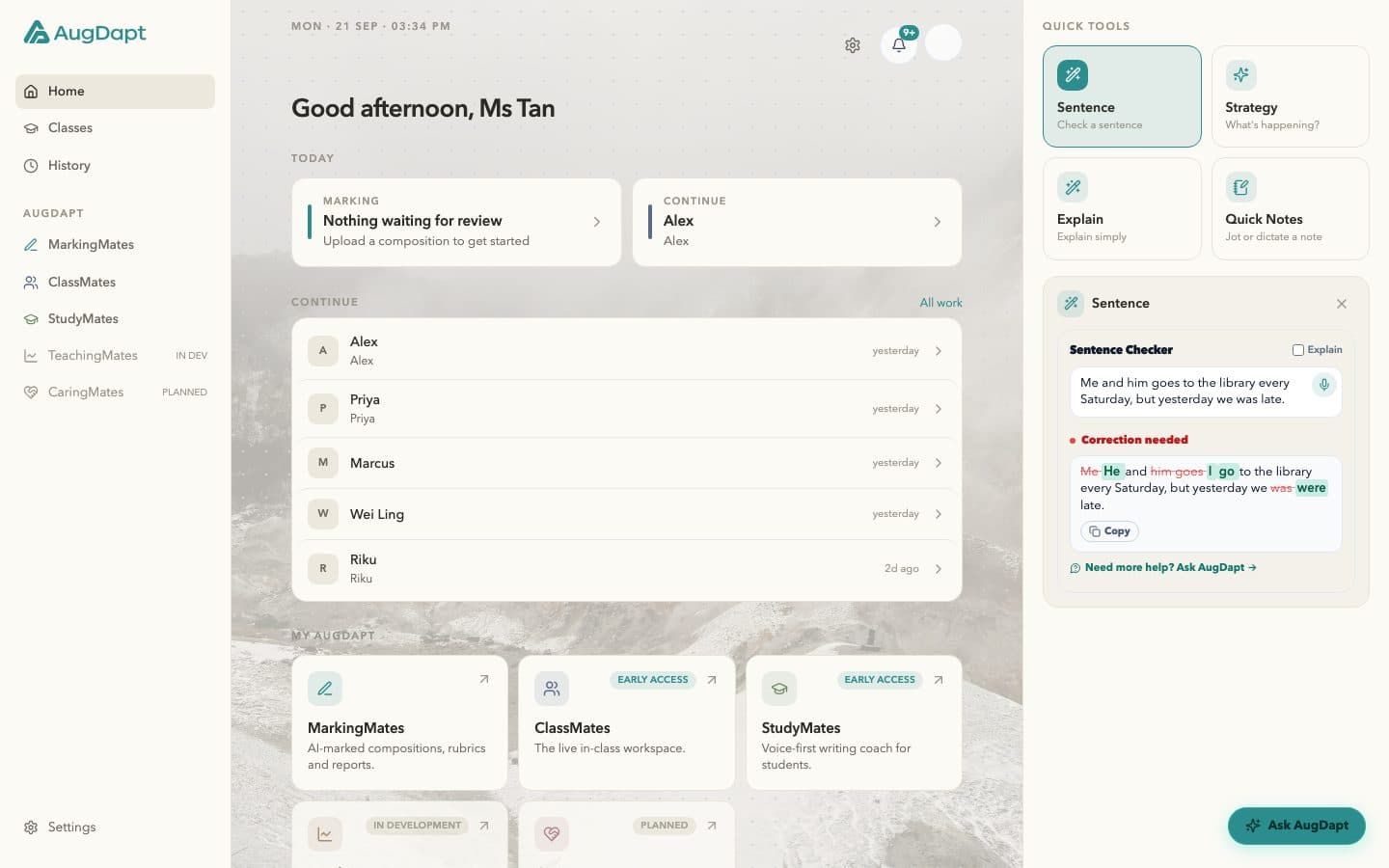
The AugDapt dashboard: today’s marking, recent work for demo learners, the five products with their status, and Quick Tools.

Dashboard. Today’s marking, the work in progress and every product from one place.

Built in Singapore for educators, learners and the people who support them. Previews show demonstration data.

The ecosystem

Meet the AugDapt ecosystem.

Different tools. Different users. Shared context.

AugDapt is already usable today, with available tools and Early Access products across different parts of the teaching and learning journey, while the wider ecosystem continues to grow.

Early Access products are functional and available to use while we continue improving reliability, persistence and the overall experience. Features may continue to evolve during this stage.

What you can do with AugDapt

Education does not happen in separate boxes. Why should your tools?

Already in use

Three products, three parts of the journey.

MarkingMates demonstrates depth. ClassMates demonstrates the classroom layer. StudyMates demonstrates the learner layer.

Depth

Available

MarkingMates

Turn student work into feedback that can lead somewhere.

Photograph or upload a composition, read it beside the transcript, and mark with feedback that lands on the exact words. Rubric aligned, evidence cited, in the teacher’s own voice. The marking becomes a record the rest of the ecosystem can use.

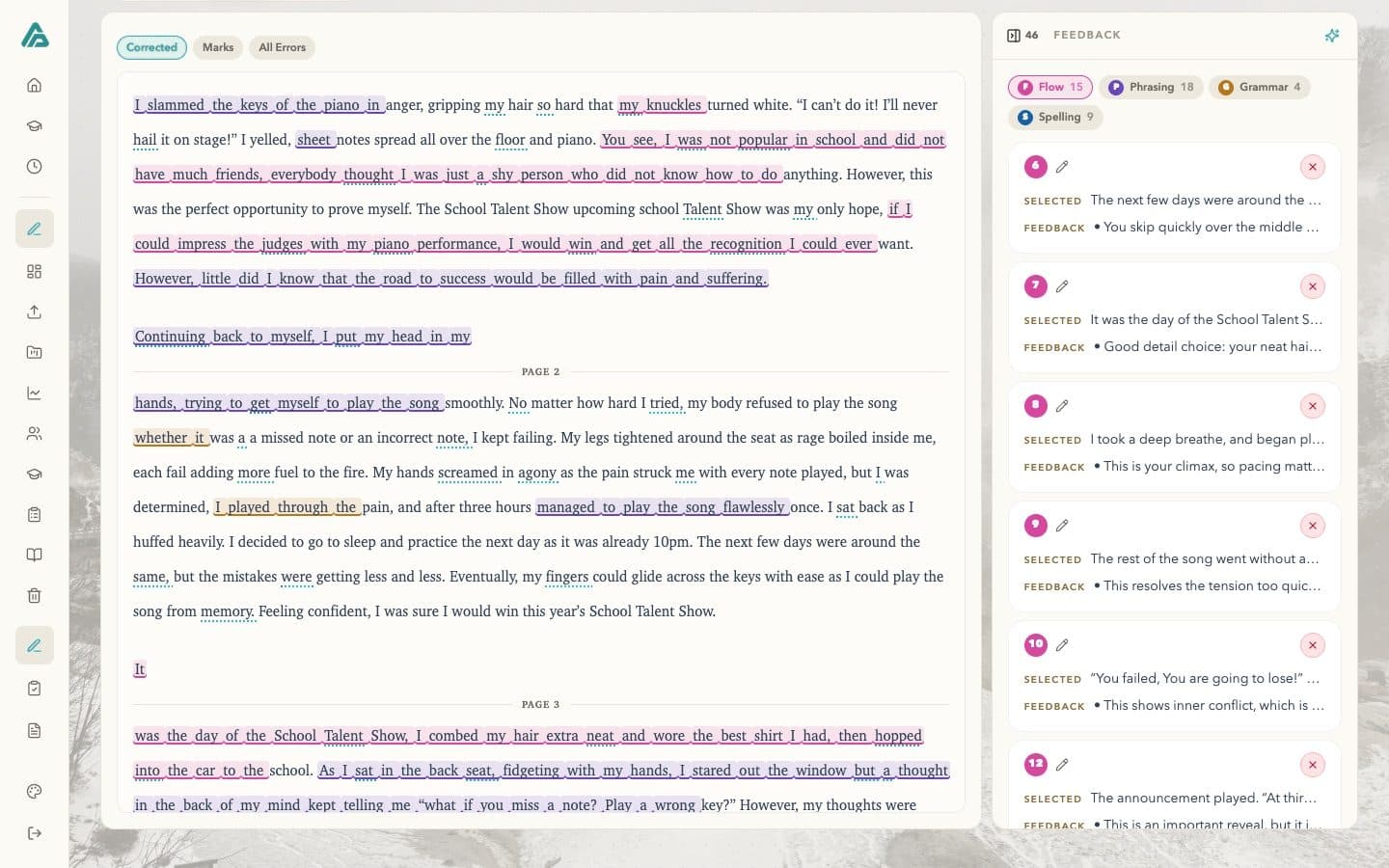
MarkingMates: the transcript of a composition with feedback highlighted on the exact words and the feedback rail open.

The classroom layer

Early Access

ClassMates

A calmer way to run the classroom.

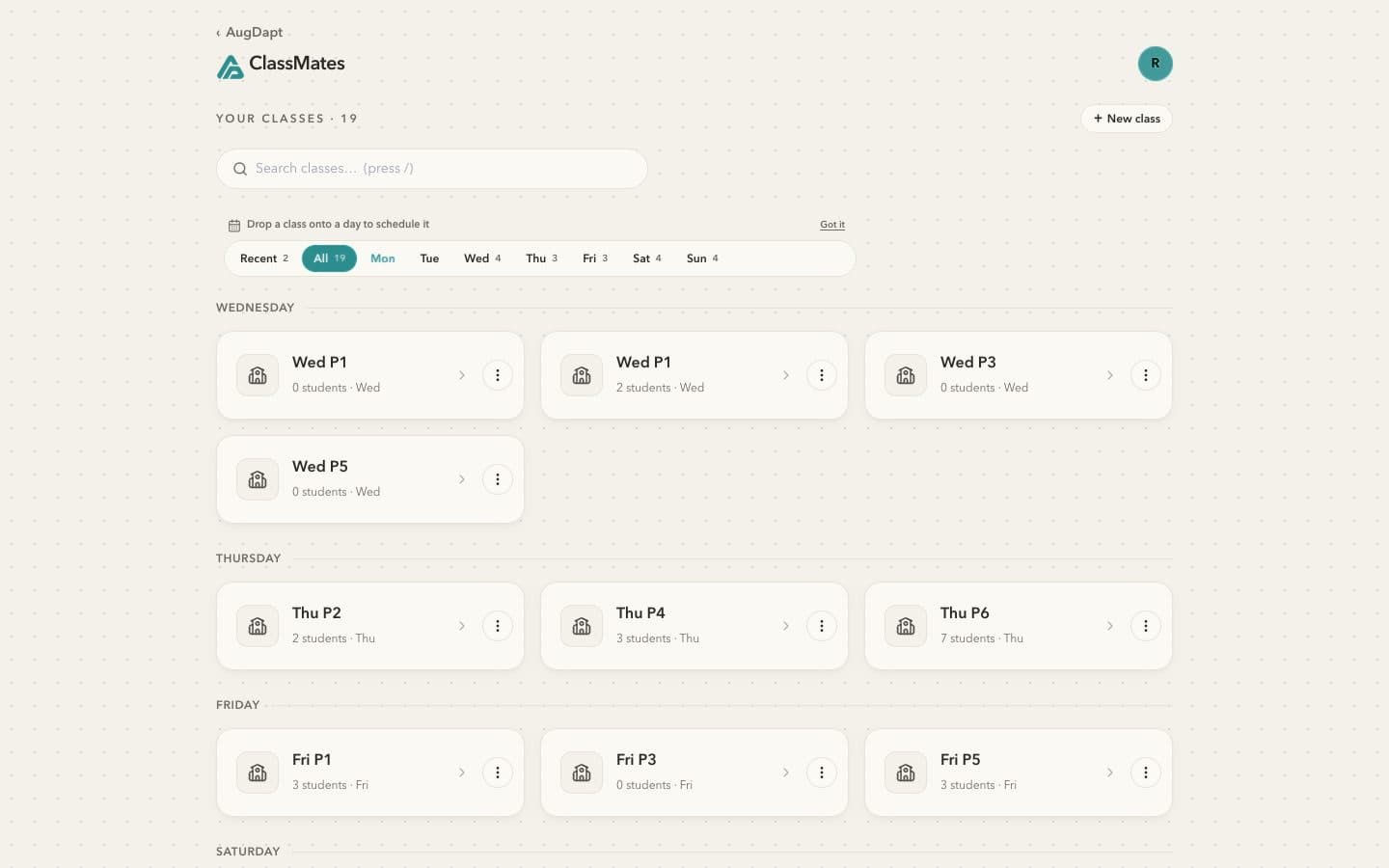
ClassMates brings everyday classroom tools into one connected space so educators can spend less time switching between systems and more time responding to the room in front of them.

From classroom engagement and presentation tools to scheduling and live teaching utilities, ClassMates is designed around the flow of an actual lesson.

ClassMates is currently available in Early Access while we continue strengthening reliability, persistence and the overall classroom experience.

ClassMates: the class list on the paper canvas, classes grouped by weekday with student counts.

The learner layer

Early Access

StudyMates

Help learners think, practise and progress with greater independence.

StudyMates gives learners their own space within the AugDapt ecosystem.

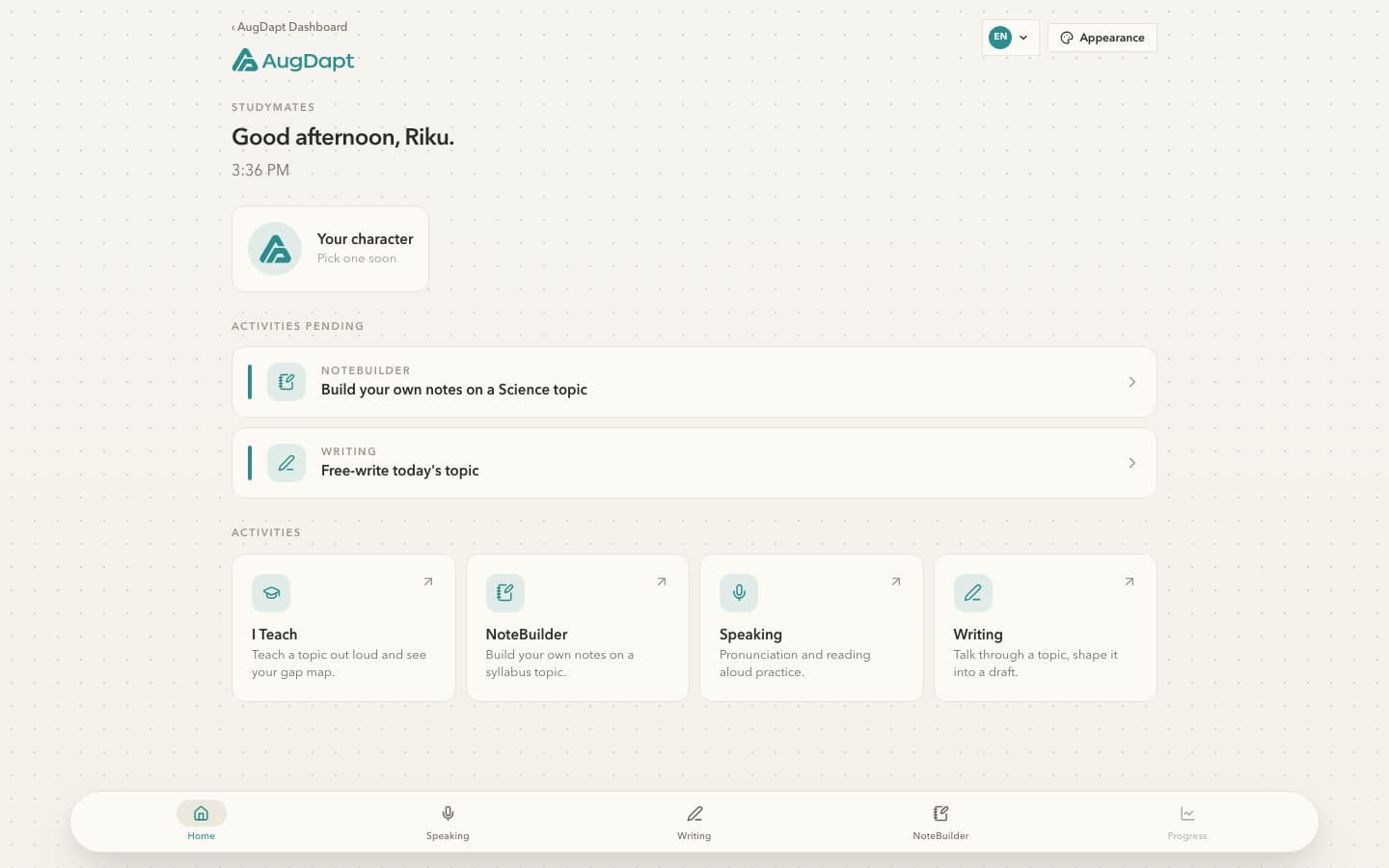
Students can talk through ideas, organise their thinking, practise skills, build notes, work on reading and develop greater independence in their learning.

StudyMates is currently available in Early Access while we continue strengthening the learning experience and platform reliability.

StudyMates: a learner shaping an idea into a draft.

Quick Tools

Available

Useful tools for the moments between the big tasks.

Not every problem needs an entire application.

AugDapt Quick Tools are lightweight education tools built directly into your workspace for the everyday tasks that appear throughout teaching and learning.

Quick Tools on the dashboard: Sentence Checker open with a sentence checked.
  • Sentence Checker

    Improve a sentence while keeping its intended meaning.

    Correct grammar, refine phrasing and optionally understand why a change was suggested.

  • Explain

    Find another way to explain it.

    Turn a difficult idea into an explanation suited to the learner or context in front of you.

  • Strategy

    Get another approach when the first one is not working.

    Explore practical teaching strategies based on what you are trying to teach or solve.

  • Parent & Student Messages

    Turn your thoughts into a message worth sending.

    Draft clear messages for parents or learners, with useful supporting information where appropriate.

  • Voice Notes

    Capture the thought before it disappears.

    Record ideas naturally and turn them into something useful inside your workflow.

  • Quick Notes

    Keep important observations close at hand.

    Capture classroom, learner or teaching notes without breaking your flow.

  • Classroom Support

    Think through what may be happening in the classroom.

    Describe a behaviour or classroom situation and explore possible reasons and practical ways to respond.

Available now within AugDapt.

Explore Quick Tools

The learning loop

One learning journey. Connected from one moment to the next.

The goal is not to collect more data. The goal is to make the information educators already create more useful.

  1. 1TeachA lesson happens. ClassMates keeps the room calm and captures what took place.
  2. 2CaptureWork comes in: a photo of a script, a typed piece, a recording.
  3. 3UnderstandMarkingMates reads it beside the teacher and places feedback on the exact words.
  4. 4ActThe next comment, the next lesson, the next message home are informed by what the learner has done.
  5. 5PractiseStudyMates turns the feedback into practice that starts from the learner’s own work.
  6. 6ShareWhat a teacher approves reaches the people at home, in plain language.

… and back to Teach.

At work

See AugDapt at work.

Actual AugDapt screens. Names in these examples are fictional.

MarkingMates: the transcript of a composition with feedback highlighted on the exact words and the feedback rail open.

A scanned composition beside its transcript. Feedback lands on the exact words, on the page and in the text, and a second opinion that knows the student is one tap away.

Human-first AI

Built to support judgement, not replace it.

Educators stay in control

AI helps organise, suggest and surface patterns. A mark, a comment or a message is never sent without a person seeing it. Judgement stays with people.

Context matters

A comment should consider what the learner has done before, not treat every interaction as an isolated prompt. That is why the products share one understanding of each student.

AI should earn its place

It is used where it makes a workflow more useful, not because it can be added. Where it is unsure, the interface says so.

Technology should augment people so they can adapt with greater confidence. That is the whole idea.

Who AugDapt is for

Different settings. The same connected record.

Trust & Security

Education data deserves thoughtful handling.

Privacy

Student work belongs to the educator or organisation that created it. Never sold, never used to train models for others.

Human oversight

Every AI suggestion is editable and attributable. Confidence is shown, not smoothed over.

Responsible access

Ownership is enforced on every request. Families see only what a teacher has approved.

Visit Trust & Security

About

Built from the classroom outward.

AugDapt Pte. Ltd. is a Singapore education technology company. Marking informs teaching, teaching informs practice, practice creates new evidence. Augmenting Adapting is the principle.

About AugDapt

FAQ

Is AugDapt only for marking?

No. MarkingMates demonstrates depth, Quick Tools demonstrate everyday usefulness, ClassMates demonstrates the classroom layer and StudyMates demonstrates the learner layer. TeachingMates (in development) and CaringMates (planned) extend the same shared understanding of each learner. AugDapt is already usable today, with available tools and Early Access products across different parts of the teaching and learning journey, while the wider ecosystem continues to grow.

What is MarkingMates?

MarkingMates turns student work into feedback that can lead somewhere. Photograph or upload a composition, read it beside the transcript, and mark with feedback placed on the exact words, rubric aligned and in your own voice. Available now for English and Chinese.

What is ClassMates?

ClassMates is a calmer way to run the classroom. It brings everyday classroom tools into one connected space: engagement and presentation tools, scheduling and live teaching utilities, designed around the flow of an actual lesson. It is available in Early Access: functional and available to use while we continue improving reliability, persistence and the overall experience.

What is StudyMates?

StudyMates gives learners their own space within the AugDapt ecosystem: voice-first idea building, Reading Aloud, NoteBuilder, guided learning and practice, and revision support. It is available in Early Access: functional and available to use while we continue improving the learning experience and platform reliability.

What are Quick Tools?

Lightweight education tools built directly into your workspace for the everyday tasks between the big ones: Sentence Checker, Explain, Strategy, Parent & Student Messages, Voice Notes, Quick Notes and Classroom Support. Available now within AugDapt.

Does AugDapt replace teachers with AI?

No. AI in AugDapt helps organise, suggest and surface patterns. A mark, a comment or a message to a family is never sent without an educator seeing it. Judgement stays with people.

What are AD Credits?

A simple way to pay for the few actions that need heavy AI processing, such as marking a whole composition, so nobody is moved onto a more expensive flat plan to cover them. Marking a composition costs 2 AD Credits, a full report costs 1, and Second Opinion is included. Everyday actions never use AD Credits, and the cost is shown before you confirm.

Can my organisation run a pilot?

Yes. A pilot should answer a real question for your organisation. We scope it together (Understand), run it with a few educators (Pilot), and look at the evidence with you (Review). Write to admin@augdapt.com or use the contact form.

Can I request a demo?

Yes. Use Book a Demo anywhere on the site, or the contact form, and the team will arrange a walkthrough of the products that fit your setting.

How does AugDapt handle student information?

Student work belongs to the educator or organisation that created it, is stored with access limited to that account and the people it shares with, and is never sold or used to train models for others. Families see only what a teacher has approved. The Trust & Security page and the Privacy Policy set out the detail.

See how AugDapt could fit the way you teach.